

As an event marketer, the last thing you should feel is disconnected from your audience.
But in a world of distractions, how do you keep their attention?
This month, we’re bringing you all of the best ways to keep your attendees fully engaged.
Upgrades to engagement tools in Splash Studio↓give you more control over chat, Q&A, polls, and networking.
With RTMP support↓and new hosting tools↓, you can produce streams so sophisticated, your audience will feel like they’re in the room with you.
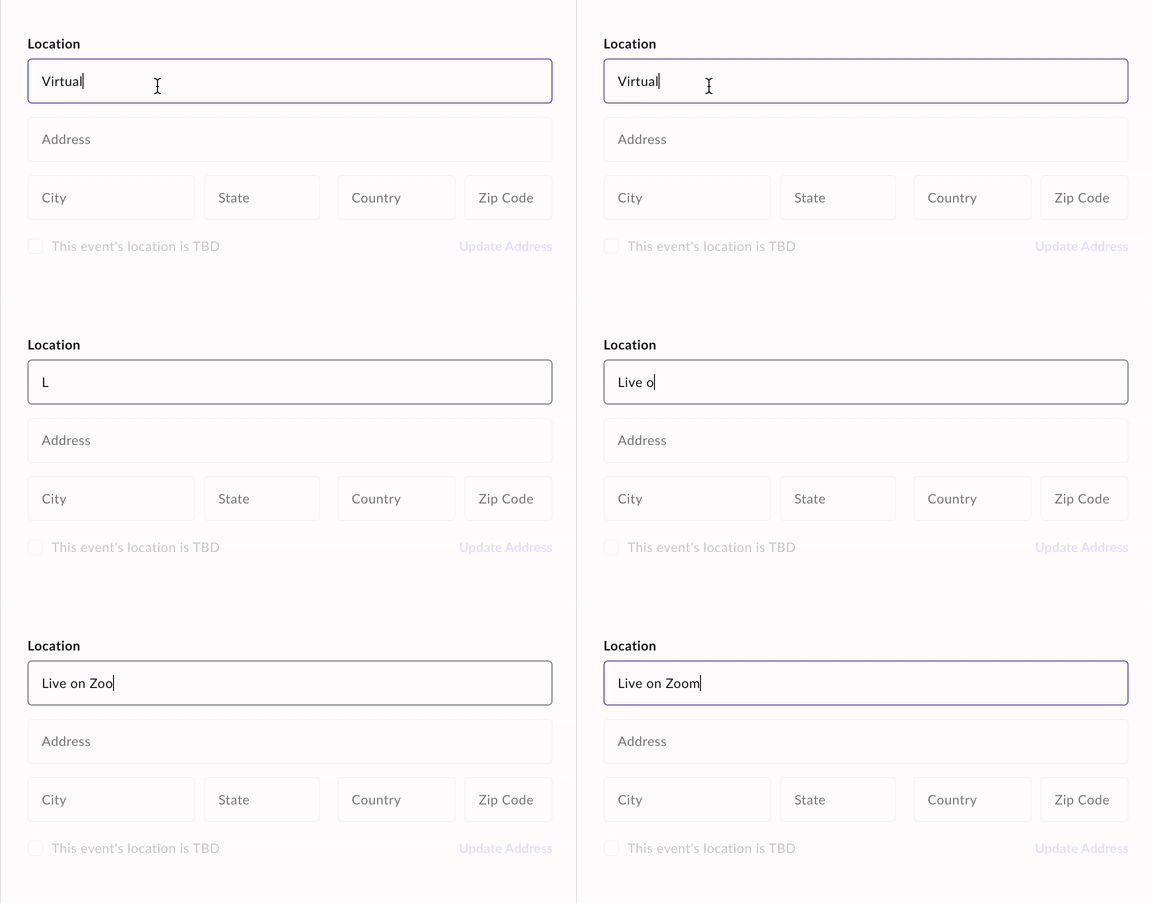
Keep your virtual audience in the know with the dynamic Location field↓.
Everyone knows that before you can engage your attendees, you have to attract them. And what better way than a design they can’t take their eyes off of? Meet the new Celebrate Branded Theme↓, designed for your June Pride events and beyond.
Bonus: We launched a new online learning portal called Splash University↓. Whether you’re new to Splash or a long-time user, our courses meet you wherever you are in your Splash journey.
Splash Studio is a paid add-on available to users with a Professional or Enterprise plan.
As event marketers, it’s our job to provide our audience with the best tools to interact with our event content.
That’s why Splash Studio — our native virtual and hybrid solution — gives hosts more control over chat, Q&A, and polling directly in Splash.
Enable the features you need and disable what you don’t — the choice is yours.
We’ve recently heard feedback from our own events that attendees don’t just want to interact with our content, they want a way to interact with each other, too.
And what better way than building networking directly into an event.
You can add or remove Networking Circles, assign moderators, and set capacity limits all within Splash.
Plus, networking is flexible so you can let attendees connect before, during, and after your event.
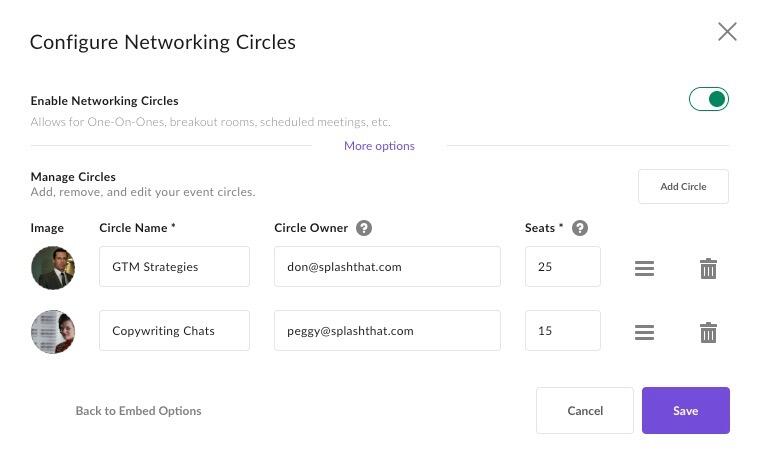
Splash Studio engagement features and Networking Circles will be configurable within the Splash platform on May 26.
Splash Studio Access
Splash Studio can be added to any Splash Pro or Enterprise plan. Visit the Splash Studio product page to learn more about pricing and packages.
Splash Studio is a paid add-on available to users with a Professional or Enterprise plan.
If you’re still stressing about hosting virtual events, you’re not alone.
Even though we’re confined to a screen, marketers are still expected to organize and host events that look and feel completely seamless.
Those of us behind the scenes know it’s not easy.
Well, it wasn’t easy before Splash Studio came along.
Splash Studio’s intuitive hosting tools give you full control over your virtual content so you can feel at ease on the big day.
Here’s what’s new:
Greenroom: After joining the event, Hosts and Presenters are directed backstage to prep before the event goes live.

Overlays: Unlike a lower third that’s applied to an individual speaker tile (e.g. name, company, role), overlays are applied to the entire stage. Hosts have the option to insert images, add primary and secondary text and colors, or upload a custom overlay.
Stage Layouts: Hosts have access to multiple stage layouts and can arrange speakers based on who is speaking or in the order that they joined the stage.
Now, we can’t promise that you won’t have some stress on the day of your event — that’s expected. But we can promise that you’ll feel as prepared as possible knowing you can control every part of your event’s production.
Want to see the full power of Splash Studio? Reach out to your Customer Success Manager to schedule a 1:1 demo.
SPLASH STUDIO ACCESS
Splash Studio can be added to any Splash Pro or Enterprise plan. Visit the Splash Studio product page to learn more about pricing and packages.
RTMP Tools are available to all users with Splash Studio access.
Getting an in-person event to translate to an online audience is tough.
So, a lot of companies treat their hybrid events like a feature film. They hire a professional production team to produce a livestream with Scorsese-like production quality.
With RTMP tools, you can now broadcast a third party video stream into Splash Studio.
This means high-production virtual and hybrid events can take place in Splash — no changes to the marketing process or attendee journey required.
How it works:
For Producers: They run the full production — video, audio, graphics, and media — in their streaming tool. And via RTMP, their stream is sent to Splash Studio, like magic.
For Online Hosts: AKA your behind the scenes moderators. They work off-camera in Splash Studio, monitoring the chat, Q&A, and polls, and enabling Networking Circles.
For Attendees: They join the event in Splash Studio, enjoy the livestream, and engage with chat, Q&A, polls, and networking. Easy-peasy.
If the simulcast part sounds tricky — don’t worry, it’s not!
Splash provides an RTMP Key and URL, which are simply entered into your production team’s streaming tech.
All users with access to the Event Settings can change the location.
In case it wasn’t obvious, virtual and hybrid events are here to stay.
So last year, we added a “how will your guests attend?” question to the event creation form.
If “Virtually” or “Virtually and In Person” is selected, the Virtual Event Page touchpoint is automatically added to your event.
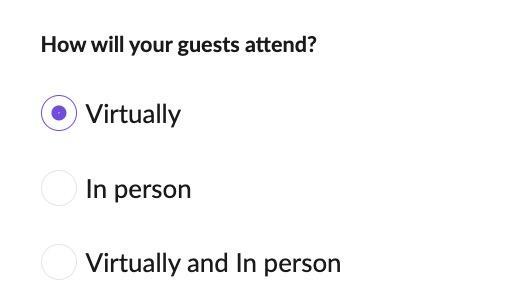
With our latest release, we added more automation and flexibility:
The best part? The Location field is linked to other guest-facing locations.
This means all you have to do is set your Location one time, and it’ll be up to date on your event page, confirmations, reminder emails, and calendar invites.
This change is already live in Splash, so you’ll see it the next time you create a new event.
Pride Month is almost upon us! And we’ve got you covered with a new theme as bold and celebratory as your events.
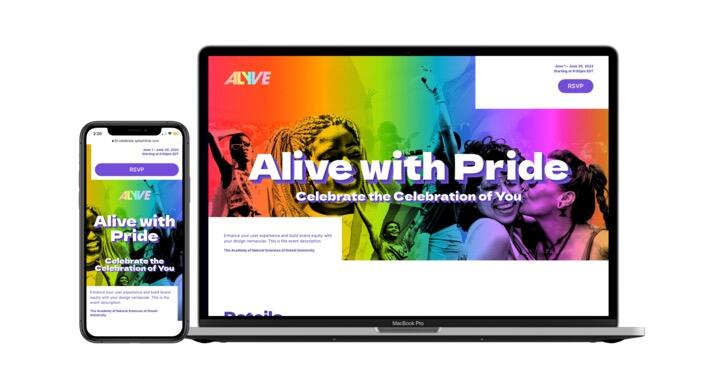
The new Celebrate Branded Theme is action-packed with surprise and delight moments like 3D drop shadows, colorful hover states, and peek-a-boo color masks. But don’t just take our word for it.
Straight from Senior Designer — and the builder himself — Alex Zahradnik:
“The Celebrate Theme includes a prominent, image-driven cover block, automated text shadows on the event title, and a can’t miss button block. This Branded Theme is also the first to feature a combined Agenda and Speaker Block that quickly communicates information to guests in a single glance.”
Let’s not forget the other built-in beauty of using a Branded Theme: pre-customized emails templates and confirmations.
Celebrate Branded Theme
How do I start using this theme? If you’re a customer with a paid Splash plan, this theme is already in your account. Just create a new event, click the Recommended tab, and check out the Networking category.
School may be out for the summer, but Splash University’s virtual campus is open for business.
Introducing our brand new online learning portal for event marketers looking to make the most of the Splash platform.
Featuring user-friendly courses organized by category and taught by Splash experts, Splash University is the best way to keep on top of event marketing pro-tips.
These interactive courses include personalized videos and proficiency quizzes that you can save and come back to whenever it’s most convenient for you.
Check it out at university.splashthat.com.
COMING SOON
Still engaged? Coming next month, you can choose whether the Virtual Event URL is single-use or can be shared with others. Be on the lookout for more information and make sure you’re subscribed to Splash release updates.
Our product and engineering teams are always working on the next big thing. Subscribe to What’s New to keep up to date, and to browse the formidable catalog of platform updates past.
Here's to running best-in-class programs, one virtual event at a time.